binance logo
bybit logo
coinbase logo
bitget logo
okx logo
kucoin logo
hyperliquid logo
bingx logo

Crypto Demo Trading Account with Virtual Funds

Try demo crypto trading with $10,000 in virtual capital and real-time exchange data. Test manual trades, automate strategies with trading bots, and practice cryptocurrency demo trading in a risk-free environment.

No credit card required.

As seen In
Forbes logo
SourceForge
SourceForge logo
Slashdot
Slashdot logo

From Sign-up to Simulated Trade

1

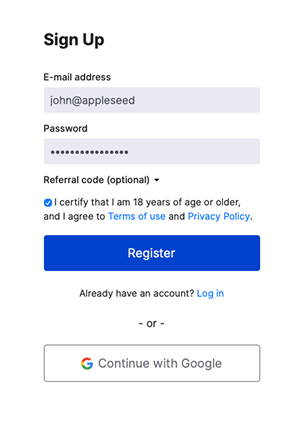
Create a free WunderTrading account

2

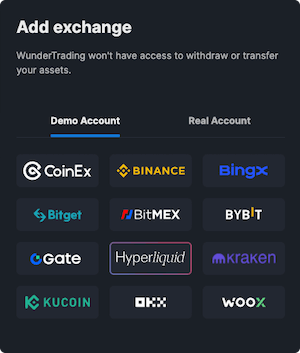
Add a Paper Trading account and pick an exchange to mirror

3

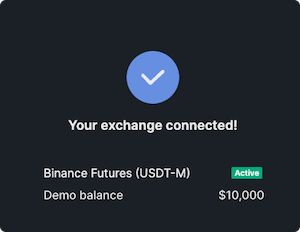
Receive $10,000 in virtual funds instantly

4

Trade and track performance with real market data

What is Crypto Demo Trading?

Crypto demo trading is a risk-free way to practice trading digital assets using virtual funds while following real market prices. It allows new traders to learn how the market works, test strategies, and build confidence before investing real money.

A crypto demo account is different from a backtest. While backtesting uses historical data, cryptocurrency demo trading runs in live market conditions with real-time prices from a connected exchange. Every order, position, and balance update behaves like it would in live trading — but your capital stays completely safe. This is the most practical way to understand market behavior and prepare for real trades.

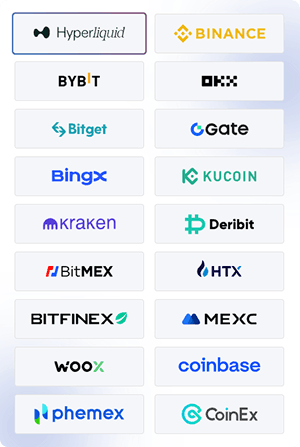
On WunderTrading, demo accounts work on Perpetual markets and use real-time exchange data from Binance, Bybit, OKX, Bitget, BingX, KuCoin, Hyperliquid, and other supported platforms. You can trade manually through the terminal or connect your crypto demo account to WunderTrading bots, including DCA, GRID, Signal, and AI bots, to test automated strategies before running them with real funds.

Demo Trading Features

Built for practicing strategies, validating bots, and learning the market risk-free.

$10,000 Virtual Starting Balance

Real-Time Market Data

Webhook execution

Perpetual Markets Supported

Compatible with All WunderTrading Bots

Long & Short Positions

Stop Loss, Take Profit & Trailing Stop

Performance Analytics & Trading History

Manage All Crypto Exchange Accounts from One Place

Trade all accounts simultaneously (applies to any single exchange per trade). See the full list of supported exchanges and features by exchange for more details.

Practice Across Every Strategy Type

Use your demo account anywhere on the platform. Test manual trading, automated bots, TradingView alerts, and arbitrage strategies — all with virtual funds on real market data.

🖥️

Manual Terminal

Place spot and futures orders on real exchange prices using $10,000 of virtual capital. Get comfortable with order types, leverage, and position management without risking real money.

Trading Bots

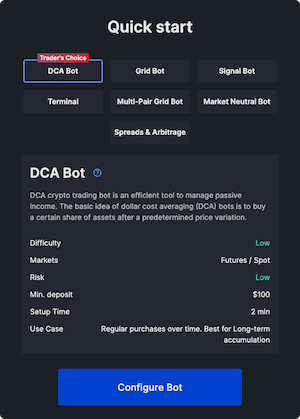
Run DCA, GRID, Signal, AI, and Market Neutral bots in demo mode. Validate parameters, take-profit settings, and stop-loss logic before deploying them with real funds.

📡️

TradingView Alerts

Connect a TradingView strategy to a demo Signal Bot to test webhook execution end-to-end. Verify alert syntax, dynamic variables, and order routing before going live.

⚖️

Spreads & Arbitrage

Test pair trading, spread strategies, and arbitrage logic without market exposure. Measure performance across multiple pairs in real-time conditions.
How Does Demo Trading Work?

FAQ about Demo Trading

What is demo trading and how is it different from paper trading or mock trading?

Demo trading, paper trading, and mock crypto trading all describe the same concept: simulated trading with virtual funds on real market data. The terms are used interchangeably. WunderTrading's demo trading account gives you $10,000 in virtual capital and full access to the platform's features for risk-free practice.

How much virtual balance do I get on a demo account?

Each demo trading account starts with $10,000 in virtual funds. You can renew the balance back to $10,000 at any time from the My Exchanges tab by clicking the renew button.

How do I open a demo account on WunderTrading?

Sign up on WunderTrading, go to the My Exchanges tab, click Add Exchange, select the Paper Trading tab, choose the exchange to mirror, name your account, and click Connect an Exchange. The full step-by-step guide is available in our Help Center.

How many demo accounts can I create?

You can create up to 2 Paper Trading accounts per user. Subscription plan limitations may also apply.

Can I reset my demo balance?

Yes. You can renew the virtual balance back to $10,000 at any time. Open the My Exchanges tab, find your Paper Trading account, and click the renew button.

Does the demo account use real market prices?

Yes. Demo accounts stream real-time market data from the exchange you select when creating the account. Price movements, volatility, and liquidity reflect live market conditions — only the funds are virtual.

Which exchanges and markets are supported in demo mode?

You can choose from any of WunderTrading's supported exchanges (Binance, Bybit, OKX, Bitget, BingX, KuCoin, Hyperliquid, and more) as the data source for your demo account. All demo accounts trade on Perpetual markets. See the full list here.

Can I test trading bots in demo mode?

Yes. You can connect any WunderTrading bot — DCA, Grid, Signal, AI, or Market Neutral — to a Paper Trading account and validate the strategy before going live.

Can I connect TradingView signals to a demo account?

Yes. Set up a Signal Bot on your Paper Trading account and point your TradingView webhook URL to it. This lets you test alert syntax, dynamic variables, and end-to-end execution without risking real funds.

Are commissions and slippage taken into account in demo trading?

Demo trading mirrors real market prices, but execution differences such as slippage, partial fills, and exchange-side fees may not be fully reflected. Demo results can therefore differ slightly from live trading.

How do I switch from demo to live trading?

Once you're ready, connect your real exchange account via API keys in the My Exchanges tab. You can then run the same bots and strategies on live funds. Demo and live accounts can coexist on your dashboard.

Is demo trading available on mobile?

Yes. The demo trading account is fully accessible on the WunderTrading mobile app, so you can practice trades and monitor bots on the go.

What are the limitations of paper trading?

Paper trading is excellent for building skill and confidence, but it has limits:
  • No emotional risk — without real money on the line, psychological pressure differs from live trading
  • Execution differences — slippage, liquidity gaps, and sudden volatility may not fully transfer
  • Risk management habits — traders sometimes neglect proper position sizing in demo mode
  • Some advanced features or trading pairs may be restricted in demo mode
Treat your demo account as if it were real to build habits that transfer cleanly to live markets.
WUNDERTRADING
WUNDERTRADING

Trusted by Traders since 2019

210K+

Traders

70K+

Bots

$1B+

30-day Volume

Manage All Crypto Exchange Accounts from One Place

Trade all accounts simultaneously (applies to any single exchange per trade). See the full list of supported exchanges and features by exchange for more details.


Start 7-day trial on a PRO plan