binance logo
bybit logo
coinbase logo
bitget logo
okx logo
kucoin logo
kraken logo
hyperliquid logo

TradingView Automated Trading with Bots

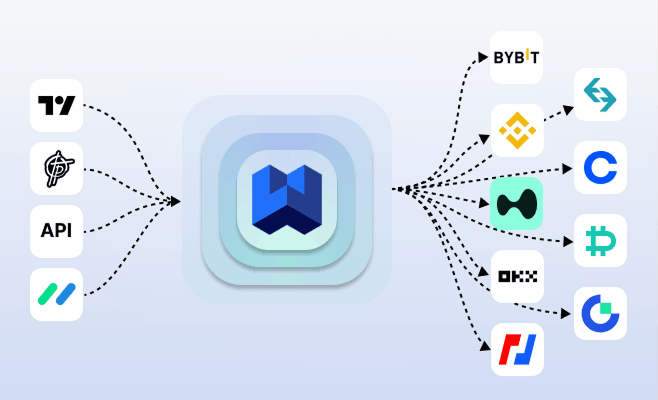
TradingView automated trading allows traders to convert TradingView alerts into automated trades without manual execution. With WunderTrading’s TradingView automation, you can connect TradingView strategies to trading bots, automate order execution across exchanges, and run your TradingView-based trading strategies 24/7.

No credit card required.

As seen In
Forbes logo
SourceForge
SourceForge logo
Slashdot
Slashdot logo

From TradingView Alert to Execution

1

Your strategy sends a signal

2

The bot applies your execution settings

3

Orders are placed automatically

4

You monitor performance in real time

tradingview automation flow

What is TradingView

TradingView is a leading charting and strategy platform used by traders worldwide. With Pine Script and custom alerts, traders can generate precise buy and sell signals based on technical conditions.

However, TradingView alone does not execute trades on most crypto exchanges. That’s where WunderTrading comes in.

What is TradingView Bot?

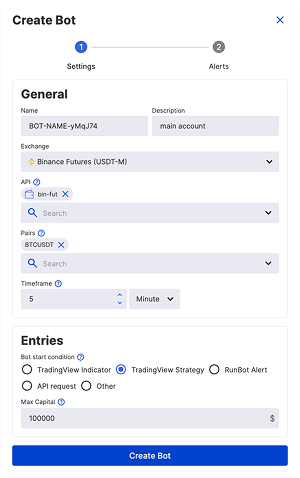
A TradingView bot automatically converts your TradingView alerts into real trades on your connected exchange via secure API.

When your strategy triggers an alert:
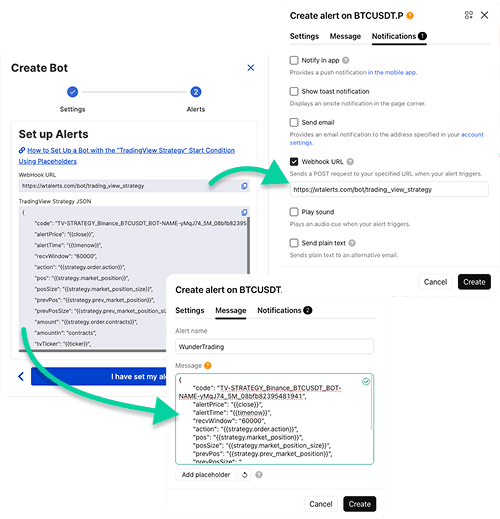
• The signal is sent via webhook
• WunderTrading applies your execution rules
• The trade is placed instantly

No manual entry. No missed signals. Fully automated execution.

TradingView Bot Features

Advanced execution, flexible risk management, and dynamic trade control — everything you need to automate TradingView strategies effectively.

TradingView Strategy Placeholders

Analytics

Max Capital Limit

Multi-API Trading

Multi-Pair Trading

DCA Trading

JSON - Fully Dynamic

Multiple entries

Swing Trading

Order size in % or fixed amount ($)

Dynamic Custom Quantity

Multiple Take Profits

Stop Loss

Trailing Stop

Automated move to breakeven

Interactive Product Demo – TradingView Bot

Automate Strategies from Top TradingView Indicator Providers

Use alerts from trusted indicator providers and execute trades automatically with WunderTrading Signal Bot.

Free Ready-to-Use TradingView Strategies

Wunder DCA strategy

Advanced multi-stage DCA strategy for automated portfolio execution.

• Signal filtering
• Structured DCA execution
• Capital protection

Setup guide

Open strategy

Wunder Keltner strategy

Breakout-based strategy that uses dual Keltner Channels with ADX trend filtering and flexible risk-management tools (ATR/fixed/Keltner SL, RR-based TP, trailing stop, breakeven, and position sizing) to automate structured long/short entries.

• KC breakout entries
• ADX trend filter
• Multiple SL modes
• TP, trailing, breakeven

Setup guide

Open strategy

Wunder Trend Reversal strategy

The Wunder Trend Reversal bot is a TradingView strategy designed to detect market turning points using price action signals with EMA confirmation and flexible risk-management tools.

• Price-action based signals
• EMA confirmation filter
• ATR or fixed SL/TP
• Risk-based position sizing

Setup guide

Open strategy

TradingView Automation (Video Guide)

Free TradingView Trading Bots & Strategies (YouTube Playlist)

FAQ about TradingView bot

Which markets does the TradingView Bot support?

TradingView Bot supports Futures and Spot markets. View the complete list of supported exchanges and markets for each exchange here.

Is it possible to configure multiple trading pairs in a TradingView trading Bot?

You can choose up to 10 trading pairs for each TradingView Bot at a time. More details are available here.

How many API profiles can be linked to the TradingView Bot simultaneously for automated trading?

The TradingView Bot allows Multi-API trading with up to 50 API profiles from the same exchange simultaneously. Additionally, platforms like TradingView provide functionalities enabling users to set up alerts and automate their trading processes.

Can the TradingView trading Bot be used with other signal automation services?

TradingView Bot also additionally supports Runbot.io, signals from your own server or any other workflow automation service such as Make, Ifttt, Zapier, N8n etc.

How can I determine why my signals are not functioning properly?

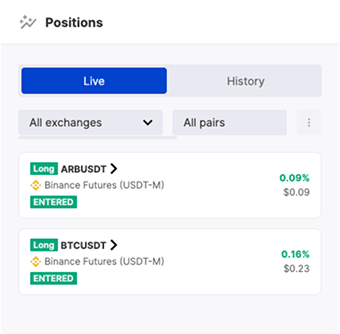
We suggest testing your signals using a Paper trading account to understand whether your Pine Script strategy or indicator is configured correctly. To determine the root cause, check and analyze the TradingView Bot logs. If the position was not opened, although the signal was processed, go to Positions tab > History. Also, make sure that the Webhook is correctly set so that your TradingView strategy or indicator is able to send signals to the correct Webhook.

Is it possible to use the TradingView Bot for partial Take Profits?

Each Take Profit in WunderTrading must be equal to or greater than the minimum trading amount required for your pair on the exchange, and you can set up to 6 Take Profits per position.

Is it possible to have both long and short positions open at the same time in my bot?

You can hold both short and long positions simultaneously as long as hedge mode is enabled.

Is there a record of my TradingView signals?

The TradingView Bot logs will display all signals you receive from TradingView or any other service.

Can I Automate a TradingView Strategy with Dynamic Variables?

Yes, you can automate alerts using dynamic variables from any source, including TradingView. These variables allow you to customize and adjust key trading parameters in real time, including:
  • Trade Direction (Long/Short)
  • Order Quantity
  • Take Profit Targets
  • Stop Loss & Trailing Stop
  • Move Stop Loss to Breakeven
  • And more...
For detailed instructions, visit our Help Center.

Do I need a TradingView Plan to automate trading alerts?

Yes, you will need at least Essential TradingView Plan to use the WebHook notification feature.

How does WunderTrading help improve trading efficiency with market data?

WunderTrading provides real-time market data to help traders analyze market trends and develop effective trading strategies. By using up-to-date information, you can make informed decisions and optimize your trading performance.

Does WunderTrading offer a free plan?

Yes! WunderTrading offers a free plan that allows users to explore the platform before committing to a TradingView subscription. No credit card is required to sign up, so you can test the features risk-free.
WUNDERTRADING
WUNDERTRADING

Trusted by Traders since 2019

210K+

Traders

70K+

Bots

$1B+

30-day Volume

Manage All Crypto Exchange Accounts from One Place

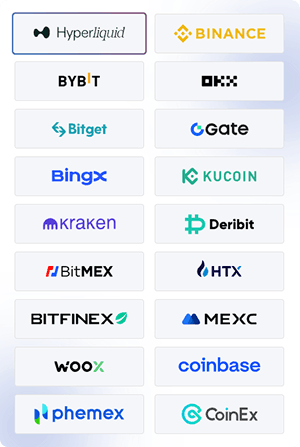
Trade all accounts simultaneously (applies to any single exchange per trade). See the full list of supported exchanges and features by exchange for more details.


Start 7-day trial on a PRO plan