



Introduction to LuxAlgo and WunderTrading
LuxAlgo is a leading provider of technical indicators, strategies and trading solutions, empowering traders to make informed decisions in the markets. With a focus on innovation and customer satisfaction, LuxAlgo offers exclusive tools, AI Agent, strategies and indicators that help traders gain a competitive edge. WunderTrading is a platform that integrates seamlessly with LuxAlgo, enabling traders to automate their trading strategies and maximize their profits.
What is LuxAlgo
LuxAlgo is a smart tool for people who trade in financial markets like forex, cryptocurrencies, and stocks. It helps traders make better decisions by giving them real-time alerts, detailed charts, AI Agent for backtesting trading strategies and a bunch of premium indicators. Lux Algo’s special algorithm helps traders improve their trading strategies and make smart trades, whether they’re trading daily or holding positions for a little longer.
Why use LuxAlgo trading indicators
Objective, Rule-Based Signals
LuxAlgo indicators provide clearly defined entry and exit signals based on technical data. This removes emotional bias and ensures your backtests are based on consistent, repeatable rules—not subjective chart interpretation.
Advanced Market Insights
LuxAlgo tools analyze trend strength, momentum, volatility, and market structure. This allows you to build strategies that adapt to different market conditions rather than relying on a single basic indicator.
AI-Powered Strategy Optimization
The AI Agent helps you:
-
Test multiple parameter combinations quickly
-
Identify the most robust settings
-
Avoid curve-fitting and over-optimization
-
Validate performance across different timeframes and assets
-
Instantly find top strategies using all technical analysis concepts; price action, dynamic signals, volume analysis, and more.
Instead of manually tweaking settings for hours, the AI accelerates the process with data-backed analysis.
Improved Risk Management
Backtesting with LuxAlgo allows you to evaluate:
-
Win rate
-
Risk-to-reward ratio
-
Maximum drawdown
-
Profit factor
-
Consistency across market cycles
This helps you build strategies focused not just on profitability—but on long-term survivability.
Community Support
LuxAlgo strategies can be connected automated through platforms like WunderTrading. Once a strategy is validated through backtesting, it can be deployed with minimal manual intervention.
Where I can find LuxAlgo indicators/strategies?
1. LuxAlgo Website
Free indicators and strategies can be found directly in their library on their website, from where you can directly add it to your TradingView account by clicking “Get Access” next to TradingView icon. While their free indicators are very well-known for their amazing performance and accuracy, they also have a great choice of paid indicators and strategies, which are even better and include more features to enhance your trading workflow. These premium tools typically offer advanced signal filtering, customizable strategies, and deeper market insights that go beyond the capabilities of the free versions. Traders can benefit from features such as multi-timeframe analysis, automated alerts, and more refined entry and exit signals, helping to improve decision-making and overall consistency.
In addition, paid indicators often come with regular updates, dedicated support, and access to exclusive tools that are designed to adapt to changing market conditions. This makes them especially valuable for traders who are looking to take a more professional and data-driven approach to their strategies.
2. TradingView
-
Open a chart on TradingView
-
Click “Indicators”
-
In the search field type “Luxalgo”
You will see a big list of indicators, strategies. Most of them are free, but the ones with a lock icon next to them are invite-only. If you want to get access to them you will need to sign up on LuxAlgo website, purchase a relevant subscription plan and link your TradingView username in the LuxAlgo’s account settings.
LuxAlgo Alert Automation
You can automate any LuxAlgo indicator and strategy in a few simple steps on WunderTrading.
Indicator automation
1. Sign up on WunderTrading and link your API to your preferred exchange for trading.
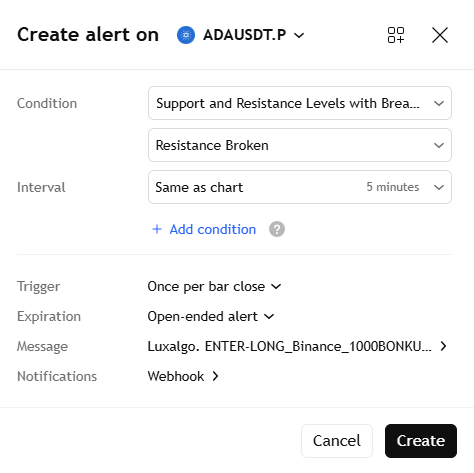
2. Find preferred LuxAlgo indicator, apply it on your chart and adjust indicator settings. In this example, we'll use "Support and Resistance Levels with Breaks".
3. Create alert for long/short trade. Click the "Alert" tab in TradingView. In the alert settings, select the indicator's name and condition. Set the trigger to "Once per bar close." This ensures the alert triggers every time the condition is met.
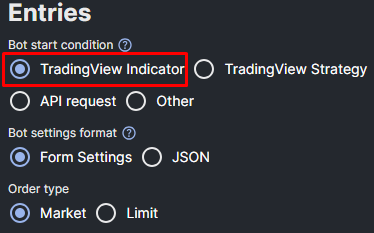
4. Keep TradingView tab opened and go to the WunderTrading’s Signal Bot tab. Click “Create Bot” and adjust all necessary parameters (see Signal Bot form breakdown here). The most important part is to select “TradingView Indicator” in the Bot start condition, which defines whether you are automating an indicator or a strategy.
After you have configured all Signal Bot parameters, press “Create bot”. Next you will see a window with bot alert messages, that you need to insert in the TradingView alert.
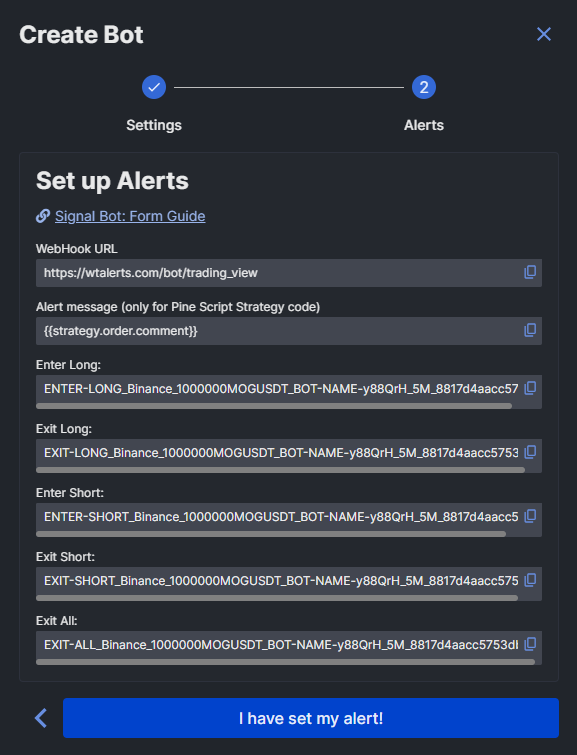
5. Copy your Signal Bot alert comment for a relevant action to trigger upon receiving an alert (Long/Short, Entry/Exit) and paste it into the “Message” field on TradingView.
You will need to create a separate alert for each action you need.
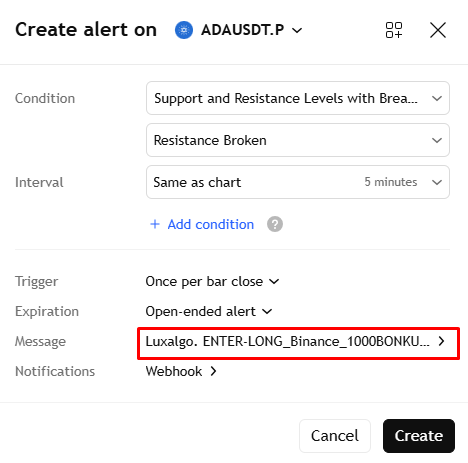
6. Copy Webhook from the bot and insert it into the webhook on TradingView
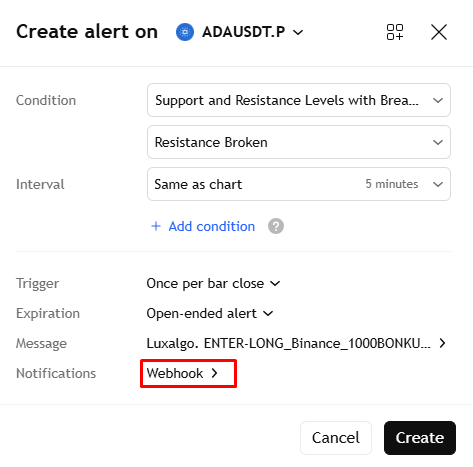
7. Press “Create” and repeat the same process for each action, such as Entry Short, Exit Long etc.
Your bot is now fully connected to TradingView and ready to execute trades automatically based on your indicator signals. Whenever the indicator triggers an alert, TradingView will send the webhook message with the configured bot comments, allowing the bot to receive alerts with actions.
Before running the bot in live conditions, we strongly recommend testing the setup on a demo account or with minimal capital to ensure everything works as expected. Double-check your indicator settings, alert configuration, and bot settings to avoid execution errors.
Once verified, your automated workflow will run continuously, requiring no manual intervention.
Strategy automation
1. Sign up on WunderTrading and link your API to your preferred exchange for trading.
2. Find preferred LuxAlgo strategy (backtester, automation), apply it on your chart and adjust strategy settings. In this example, we'll use "LuxAlgo – Backtester S&O".
3. Click the "Alert" tab in TradingView. In the alert settings, select the strategy name and Order fills and alert() function calls condition (may vary depending on the strategy logic). Choose expiration of the alert and open “Message” tab.
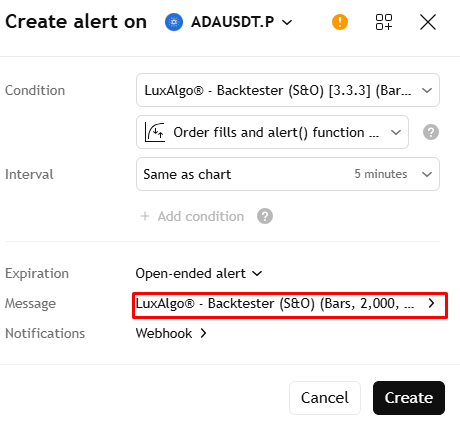
4. Keep TradingView tab opened and go to the WunderTrading’s Signal Bot tab. Click “Create Bot” and adjust all necessary parameters (see Signal Bot form breakdown here). The most important part is to select “TradingView Strategy” in the Bot start condition, which defines whether you are automating an indicator or a strategy.
5. When all parameters are adjusted, copy TradingView Strategy JSON message from the bot and insert in into the TradingView’s alert message.
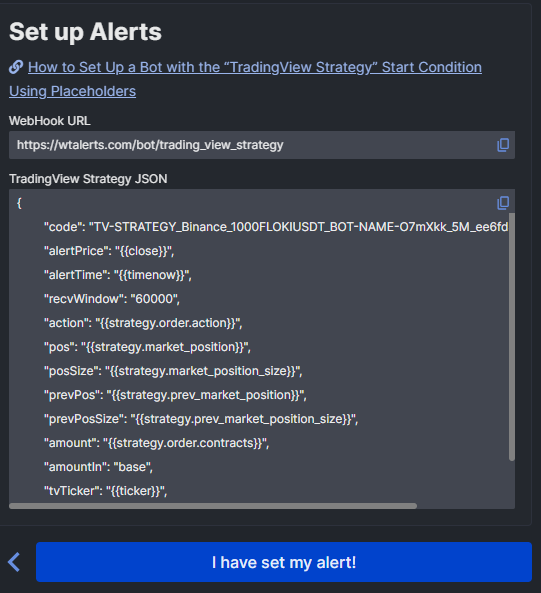
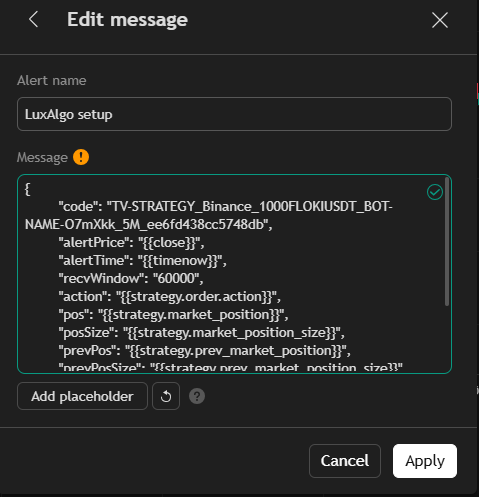
6. Copy Webhook from the bot and insert it into the webhook on TradingView.
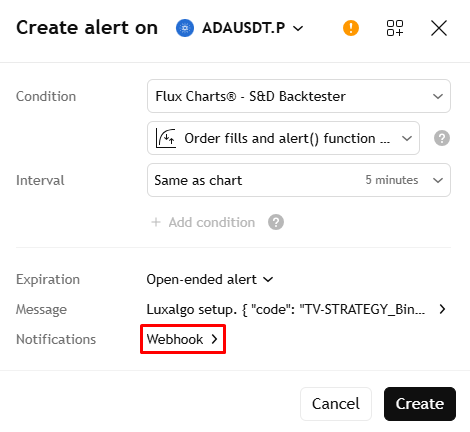
7. Your bot is now fully connected to TradingView and ready to execute trades automatically based on your strategy signals. Whenever the strategy triggers an alert, TradingView will send the webhook message with the configured bot comments, allowing the bot to receive alerts with actions.
Before running the bot in live conditions, we strongly recommend testing the setup on a demo account or with minimal capital to ensure everything works as expected. Double-check your indicator settings, alert configuration, and bot settings to avoid execution errors.
Once verified, your automated workflow will run continuously, requiring no manual intervention
Creating a Trading Bot
Creating a Signal bot with LuxAlgo and WunderTrading is a straightforward process. Traders can choose from a variety of pre-built strategies or create their own custom strategy using LuxAlgo’s indicators and tools. The platform provides a drag-and-drop interface that makes it easy to build and configure the bot. Once the bot is created, traders can backtest and optimize it to ensure that it performs well in different market conditions.
LuxAlgo AI Backtesting: Smarter Strategy Testing with AI
LuxAlgo’s AI Backtesting feature is designed to transform how traders create, test, and refine trading strategies. Instead of manually coding and testing ideas, traders can simply describe a strategy in plain language, and the AI will generate, analyze, and backtest it automatically.
At its core, the tool acts as a conversational AI assistant that scans millions of pre-built strategies and combines them with LuxAlgo’s proprietary indicators to deliver actionable results. This dramatically reduces the time it takes to go from an idea to a fully testable trading system.
Key Features
1. Natural Language Strategy Creation
Users can ask the AI for strategies using simple prompts (e.g., “low drawdown BTC strategy”), eliminating the need for manual coding or complex setup.
2. Automated Backtesting & Optimization
The AI tests strategies on historical data, automatically evaluating performance metrics such as win rate, drawdown, and profit factor.
It also helps optimize parameters and simulate realistic conditions like fees and slippage, making results more reliable.
3. Massive Strategy Database
With access to millions of strategies across multiple assets, traders can quickly discover and compare different approaches without hours of manual testing.
4. Real-Time Data Updates
Backtesting results are continuously updated as new market data becomes available, ensuring strategies reflect current market conditions rather than outdated performance.
5. One-Click Strategy Deployment
Once a strategy is validated, it can be exported and replicated directly on TradingView as a ready-to-use script, bridging the gap between research and execution.
Real Examples of LuxAlgo AI Backtesting in Action
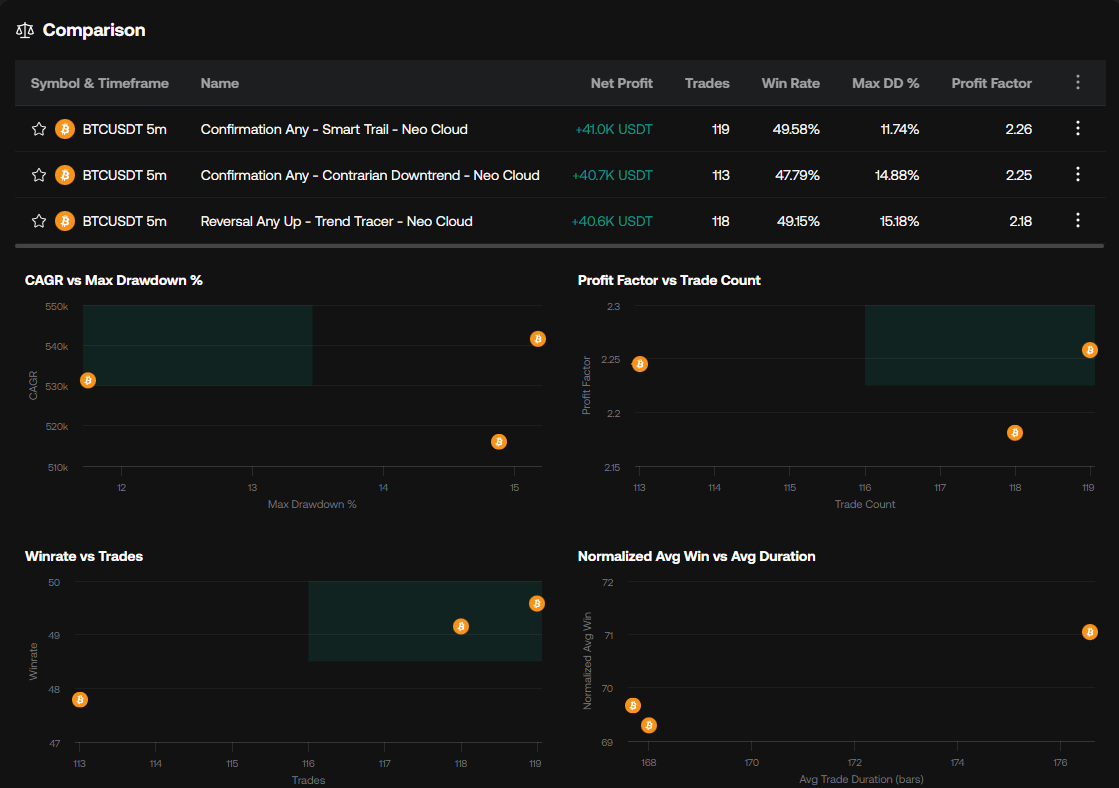
1. Finding the Best Strategy Automatically
A trader can simply ask:
“What is the best performing strategy across all crypto tickers on the 5-minute timeframe?”
The AI will:
-
Scan millions of strategies
-
Rank them by performance metrics like net profit, win rate, and drawdown
-
Return the top-performing setups instantly
Real use case:
Instead of manually testing dozens of strategies, you instantly get a shortlist of the best-performing ones for your exact timeframe.
2. High Win-Rate Strategy Discovery
Example prompt:
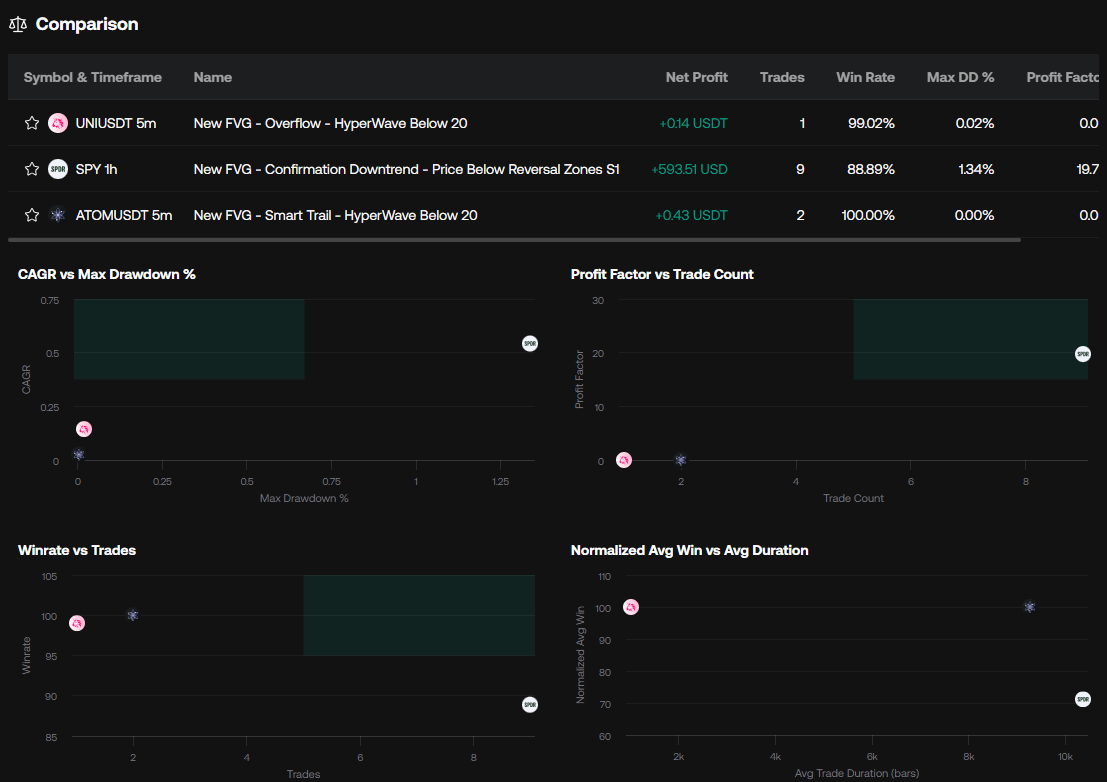
“Give me three strategies using fair value gaps with a win rate above 80%.”
What happens:
-
AI filters strategies by specific concept (FVG)
-
Applies a performance constraint (80% win rate)
-
Returns a small set of optimized strategies
Real use case:
Perfect for traders who want precision setups, not just generic signals.
3. Risk-Optimized Strategy Search
Example:
“Find a strategy with above-average net profit but below-average drawdown.”
The AI:
-
Balances profitability vs risk
-
Surfaces strategies that are not just profitable—but stable
Real use case:
This is ideal for traders focused on long-term consistency, not just aggressive gains.
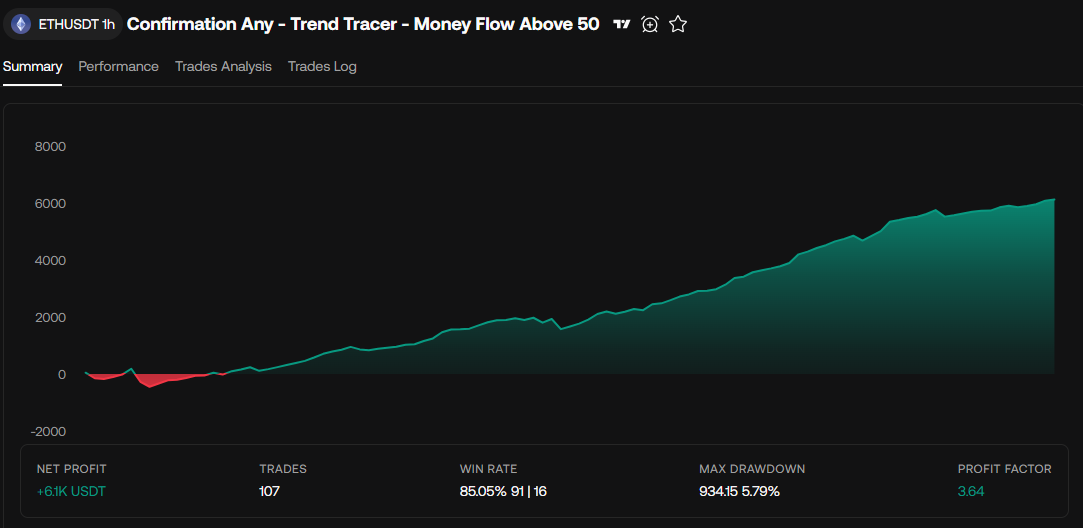
Why These Examples Matter
These aren’t just features—they represent a shift in workflow:
Instead of building strategies manually → testing → failing → repeating
You now:
Ask → Filter → Compare → Deploy
LuxAlgo’s AI essentially acts like a strategy search engine + quant assistant, scanning millions of backtests and returning the best matches instantly.
How To Automate Them
There are two ways of automating strategies generated by LuxAlgo:
Replicate Strategy on TradingView
If you click on TradingView icon, LuxAlgo shows you step-by-step guide on how to replicate strategy on TradingView using their existing backtesters and indicators with a few adjustments.
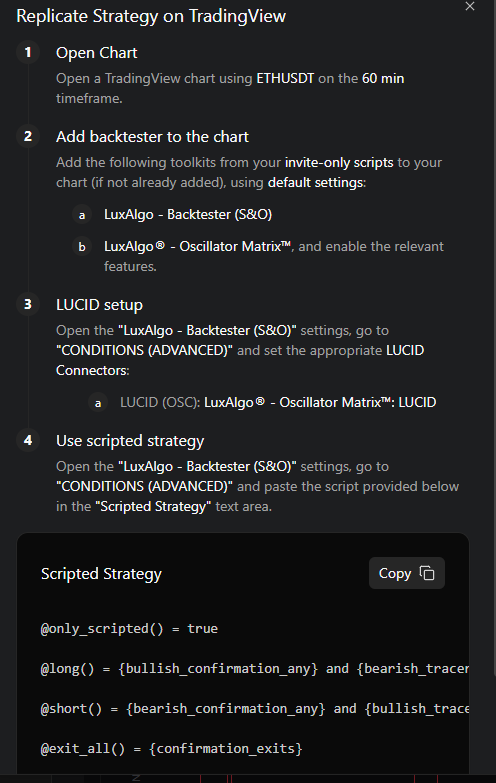
Once the strategy is replicated on TradingView, you can then automate it by creating alerts directly from the strategy using the method described above in this article. This enables fully automated execution through trading bots or supported exchanges.
Create Alerts Directly From LuxAlgo
If you click on the alarm icon (near TV icon) you will see a pop-up form, which allows you to setup alerts in a similar way as TradingView does, but they are going to be sent directly from LuxAlgo.
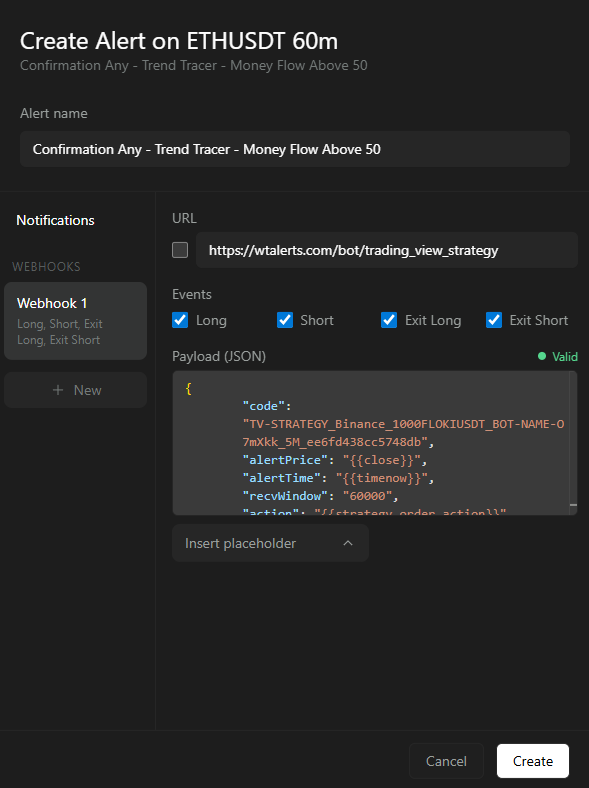
How to Scale Your Trading with LuxAlgo and WunderTrading
Automating your trading with LuxAlgo and WunderTrading allows you to move beyond manual execution and build a structured, scalable trading system. Instead of relying on emotions or constantly monitoring charts, you can leverage data-driven strategies, AI-powered backtesting, and automated execution to create a more consistent and efficient workflow.
LuxAlgo provides the foundation—powerful indicators, strategy generation, and AI optimization—while WunderTrading acts as the execution engine, turning signals into real trades through fully automated bots. Together, they eliminate much of the repetitive work involved in trading and allow you to focus on refining and improving your strategies rather than executing them manually.
As you scale, the key is to start simple and gradually expand. Begin with one validated strategy, test it thoroughly in demo conditions, and monitor its performance. Once you’re confident, you can diversify across multiple strategies, assets, and timeframes to reduce risk and increase potential returns. Regularly reviewing performance metrics and adjusting parameters ensures your system remains effective in changing market conditions.
Ultimately, successful trading automation is not about finding a “perfect” strategy—it’s about building a repeatable process. By combining LuxAlgo’s analytical power with WunderTrading’s automation capabilities, you can create a sustainable trading system designed for long-term growth and consistency.